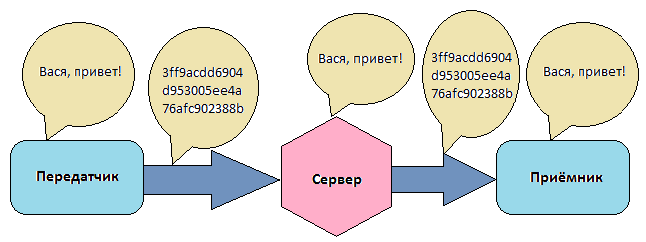
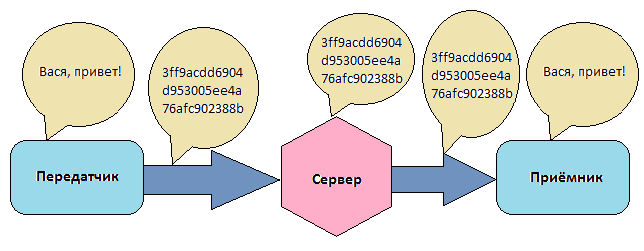
| This is an experimental email for those who value the security and confidentiality of correspondence, as well as the absence of SPAM. Even when transmitting information over secret protocols (HTTPS, SSH), there is a possibility of data interception and compromise (reading). This is illustrated in the following figure, which shows that the "weak link" here is the server on which the data is stored in clear text. The human factor, back-doors, hacker attacks, etc. can compromise the information stored there. Also, there is evidence that the protocols themselves do not protect the data absolutely. Our mail is devoid of all these disadvantages. It is based on a symmetric Hash Mask algorithm, in which data is encoded and decoded ONLY on the client's screen, and more specifically in the browser. This ensures that data interception at any stage: communication channel, server, etc., will not lead to their compromise. The whole secret of reliability lies in the openness and simplicity of the algorithm and scripts, and therefore in the full user control of the entire process of maintaining the secrecy of their data. How do I send an email?
In the "Subject" field, enter a unique name or the recipient's e-mail address. Enter the text of the message, and in the "Code word" field — the characters that you will then pass to the recipient. Click on "Encrypt" and then on "Send". How do I receive the email?
In the "Subject" field, enter the name of your correspondence, or your e-mail (by agreement with the sender). After clicking on the "Search" button, emails on this topic will be found for you, which are stored on the server. Select one of them, for example, the most recent one, enter the "Code word" and click the "Decrypt" button. If everything is done correctly, the text of the letter will appear in the window. Do I need any registration?
Registration is not required, the mail is completely anonymous. How do I make sure that data is decrypted/encrypted only in the browser?
You can verify this by receiving an email, disconnecting from the Internet, and only then entering the code word and decrypting the text. Similarly, in reverse order, you can do the same when sending a letter. You can also practice encrypting texts in the Sandbox (off-line) section. Advanced users can view the scripts themselves; the code in them is completely open. They use: jQuery, JavaScript-MD5, and our script, which encrypts/decrypts text and serves the user interface. For clarity, simple and intuitive JavaScript and jQuery functions were used. How do I transfer the "Code Word"?
The code word is the key point of our whole venture. It must be sent to the recipient via an independent communication channel, for example, via an SMS message. If this condition is met, then there is no other way, except by reading the message with you from the monitor screen, it cannot be intercepted and decrypted! How do I choose a "Code word"?
The code word can consist of numbers and Latin characters. Cyrillic and special characters will theoretically work the same way, but they haven't been tested everywhere yet. For example, you can use a word known only to you and the recipient, or, if there are several participants in the correspondence, to all of them. The number of characters of the code word is unlimited. How do I choose the "Subject" of an email?
It is best to use e-mail as the "Subject". But it can be any combination of numbers and letters. It is important here that this combination is as unique as possible. The number of theme characters is unlimited. What happens if the name of my "Theme" matches someone else's?
Nothing terrible will happen: it's still impossible to decipher the text of the letter itself without knowing the code word. What is the difference between a "Theme" and a "Code Word"?
A topic is the name of a conversation about the same issue or with the same subscriber. In the second case, this subscriber's e-mail is entered as the subject. In the same topic, the code word can remain constant or change periodically (by agreement of the parties). The topic can be transmitted to the receiving party via an open communication channel. The code word must be transmitted via an independent communication channel. The same code word can be used by the user in different topics. How many people can participate in correspondence on one "Topic"?
As many as you want. It is important that they all know the name of the topic and the code word. What characters can be used in the text of the letter?
The text of the letter can contain numbers, Latin, Cyrillic, and special characters. Is it possible to transfer files?
Not yet. Just the text. How many emails are stored on the server?
One month. How are my messages stored on the server?
A real example. In the "Send" section, the following were entered: - Test topic
- The text of the message is a communication check!
- The code word is Lighters
As a result, the following file was created on the server: fef89e41320e80e4b84822b8df142349_1404124604. From the example, we see that the contents of the file are encrypted, and even its name is a hash, from which it is impossible to understand the name of the "Topic". I want to send the encrypted text of an email through other communication channels. What to do?
In the Sandbox section, encrypt the text and transmit it through other communication channels in this form. Your subscriber can enter this text in the window in the same section and decrypt it. This can be done offline (without network access). Which operating systems or browsers does yandex.Mail work in?
In any OS and in any modern browsers. How are things with SPAM in your mail?
It is fundamentally impossible here! There is no point in sending an email that the recipient will not be able to decrypt :) |